
Updated 2026-08-29
Redacted Bank Statement Example: What to Black Out
A redacted bank statement is a bank PDF with sensitive fields permanently removed—account numbers, routing digits, or transactions you do not need to share—while income and identity proof stay visible for lenders, landlords, or CPAs. If you searched for a redacted bank statement example or how to black out a statement for proof of address, this guide covers true redaction (not overlay black boxes), what a safe export looks like, and verification. For a single statement, try the Bank Statement template online—account numbers, routing digits, and payment QR/barcodes are pre-selected. Related: redacted card image with name & last 4, how to black out information on a PDF, how to redact a PDF. For a lender or landlord packet, see redacted bank statements for lenders and landlords.
- → What is a redacted statement and will my lender accept it?
- → How do I create a redacted bank statement PDF?
- → What does a redacted bank statement example look like?
- → Can I black out my bank statement for proof of address / landlord?
- → How do I black out my bank statement without the text coming back when they copy-paste?
- → What exactly should I hide—full account number or just transactions?
What is a redacted statement?
A redacted statement is not a scribbled printout—it is a PDF export where sensitive text was permanently removed from the file structure. Recipients should see your name, deposit patterns, and date range, but not full account numbers, unrelated purchases, or routing details you chose to hide. If they can still copy “redacted” digits into Notepad, you have a visual blackout only, not a redacted statement.
True redaction deletes data; it does not change balances or amounts that remain visible. Never edit numbers—that is fraud.
Redacted bank statement example (what to keep vs black out)
A typical “redacted bank statement example” for a mortgage or rental packet keeps: account holder name, statement period, ending balance or deposit lines that prove income, and sometimes the bank logo. It blacks out: full account and routing numbers, check images with MICR lines, payment barcodes/QR, and merchant rows you do not need to share (medical, legal, gambling, etc.). Ask the recipient once—many landlords only need name + address proof deposits, not every purchase.
| Field | Usually keep | Usually redact |
|---|---|---|
| Name on account | Yes | Joint holder if not on application |
| Statement dates | Yes | — |
| Deposit / payroll lines | Yes for income proof | Unrelated personal merchants |
| Full account number | No | Last 4 only if they insist |
| Routing number | No | Always for most shares |
| Address on statement | Often yes for proof of address | Old address if you moved |
| Barcode / QR stub | No | Entire stub band |
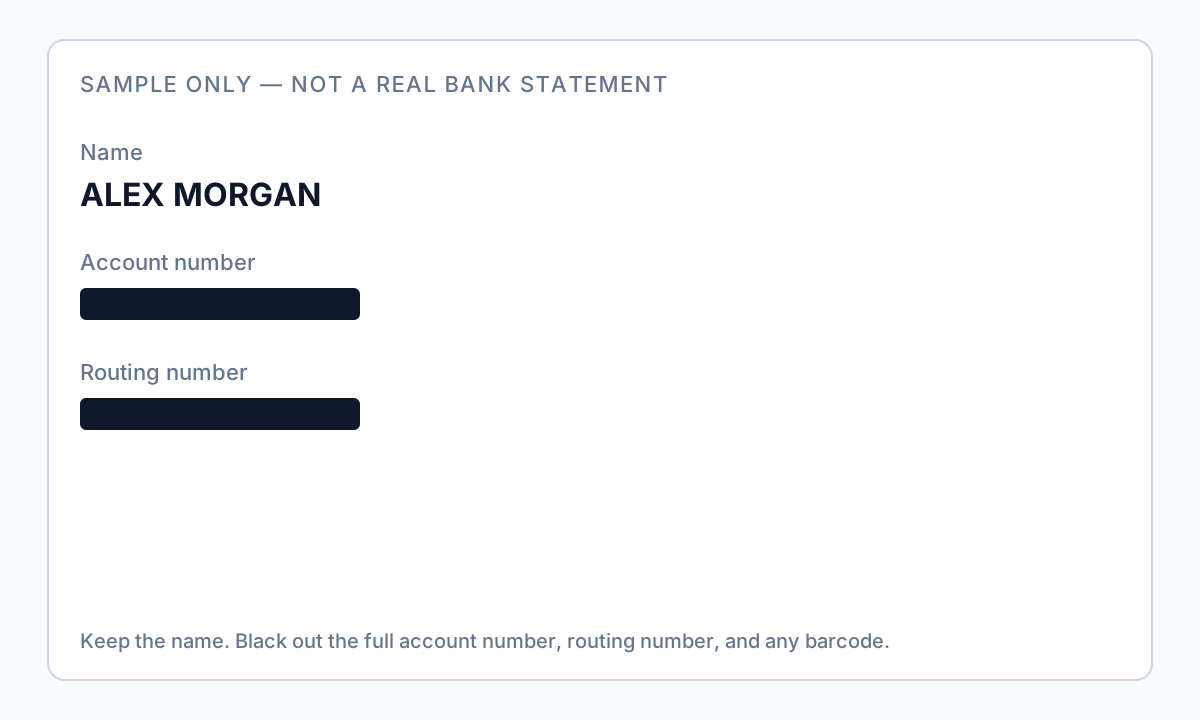
For “can I black out my bank statement when giving proof of address,” keep name, service/mailing address, and statement date; redact account numbers and transaction detail you do not need. For income, keep payroll deposits visible and still redact full account identifiers.
Why bank statement redaction goes wrong
Most “redactions” on bank PDFs are visual overlays—a black rectangle drawn on top of text. The PDF file still stores the original characters in its content stream. Anyone can press Ctrl+A, copy, paste into Notepad, and read account numbers you thought were hidden. Court filings and news reports regularly expose this mistake when black-barred documents leak underlying text within hours.
Open your “redacted” PDF → Select All (Ctrl+A / Cmd+A) → Copy → Paste into Notepad or TextEdit. If any account number, routing number, or address appears, the file is not safe to send. Start over with true redaction or a flatten-to-image export you have verified.
Forum users often fall back to printing the statement, covering lines with tape, and rescanning. That works if the scan is a flat image with no hidden OCR text—but it is slow and looks unprofessional for lenders. A desktop redaction tool that removes underlying text (or burns pages to verified images) gives you the same safety with a searchable workflow for multiple months of statements.
What to redact — by who is asking
| Recipient | Usually keep visible | Usually redact |
|---|---|---|
| Mortgage underwriter | Your name, deposit totals, employer direct deposits, date range | Full account number, routing number, unrelated purchases, Zelle counterparty names |
| Accountant / CPA | Transaction detail for categories they need, interest lines, totals | Account number if they already have it on file; spouse SSN if on joint docs |
| Landlord / proof of address | Name, address block, maybe one recent deposit | Full account number, entire transaction history, routing number |
| Court / opposing party | Only what the order or meet-and-confer allows | Account numbers, SSN, third-party names per protective order |
Email the recipient: “Which fields do you require on the statement PDF?” Many underwriters want consecutive months and net deposit totals—they do not need your coffee shop history. One sentence saves an hour of over-redacting.
Where account numbers hide on bank PDFs
- Header band on page 1 (account nickname + masked/unmasked number)
- Footer repeated on every page (“Account ending in …” plus routing on some banks)
- Transaction detail columns (counterparty account fragments in ACH/wire lines)
- Check images appended at the end of the PDF
- MICR-style encoding lines on scanned check deposits
- QR codes or barcodes on payment stubs if your bank app exports them
Redacting page 1 only is the most common failure we see. After export, use your PDF viewer’s Find feature and search for the last four digits of your account—if hits appear on page 4, you missed a footer.
Tool comparison for bank statement PDFs
| Method | Safe for account numbers? | Notes |
|---|---|---|
| Mac Preview / highlight shapes | No | Overlay only; text remains extractable |
| Free “upload PDF” websites | Risky | Full statement leaves your device; retention unknown |
| Adobe Acrobat Pro Redact → Apply | Yes | Industry standard if you already subscribe |
| Print → marker → rescan | Mostly | Verify scan has no OCR text layer leaking digits |
| Offline PII redaction desktop app | Yes | Auto-detect account/routing patterns; batch multiple months locally |
Offline workflow with auto-detection (example)
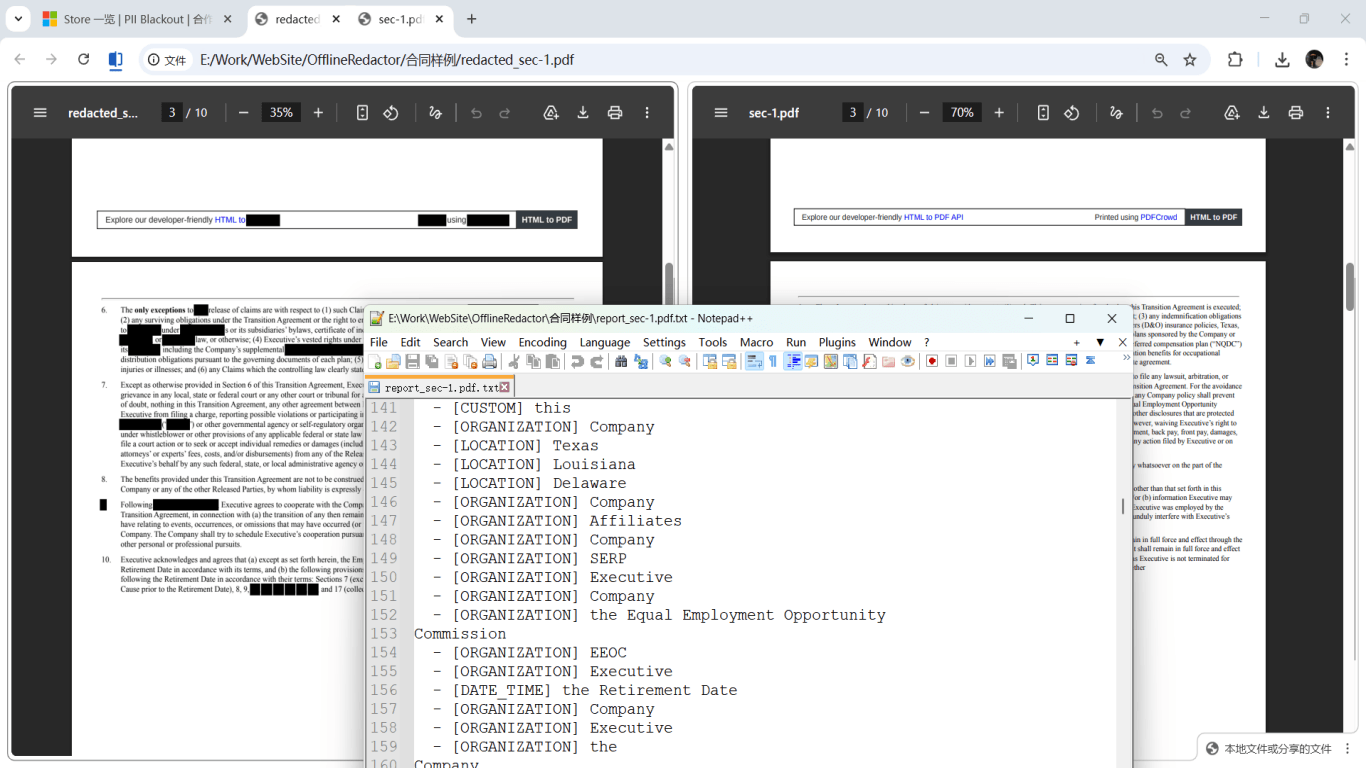
For several months of statements, load PDFs into an offline tool, enable financial entity types (account numbers, routing numbers, addresses), run analysis, review highlighted matches, then apply redaction. Step 1 should show hundreds of detections on dense statements—that is normal; deselect false positives before Step 2.

Will lenders accept a redacted statement?
Most lenders accept redacted statements when they can still verify income and identity from what you left visible. They may reject files that look tampered without explanation, or demand “original” portal downloads plus a cover letter describing what was redacted and why. If guidelines say “no altered documents,” call the loan officer—true redaction with verifiable portal metadata is often acceptable when you document the process.
Never submit a statement you edited by moving numbers around or changing balances—that is fraud. Redaction removes information; it does not alter amounts that remain visible.
Step-by-step workflow
- Email the recipient listing what they need (months covered, deposits only vs. full detail, name/address requirements).
- Download PDFs from your bank portal; save originals as bank-original-YYYY-MM.pdf in a folder you do not share.
- Run the Ctrl+A copy test on originals so you know what text exists before redaction.
- Open statements in offline redaction software—avoid uploading full financial history to random websites.
- Enable detection for account numbers, routing numbers, phone numbers, and addresses; add custom keywords if your bank uses a unique label (e.g., “Member Share ID”).
- Run Step 1 / Analyze on all files; review every page in the preview, especially footers and check images.
- Deselect false positives (e.g., public routing numbers to IRS that appear in tax payment lines if your CPA needs them).
- Manually box any missed regions (barcodes, check thumbnails).
- Apply permanent redaction (Step 2); export to a new folder as bank-redacted-YYYY-MM.pdf.
- Verification pass: Find/search account digits, Ctrl+A paste test, open in a different PDF reader.
- Scrub PDF metadata (author/email from export settings) if your tool supports it.
- Send redacted copies via the lender’s secure upload or encrypted email; keep originals offline.
Common mistakes
- Drawing black boxes in Preview or Word
These apps add drawing layers; pdftotext and copy-paste still read the statement underneath. Same failure mode as court filings that made headlines when journalists extracted “redacted” names.
- Redacting only the big account number on page 1
Footers, check images, and wire detail lines repeat identifiers. Search the whole PDF for digit patterns after you think you are done.
- Using JPEG in Paint without flattening
If you must use image editing, export each page as a flat image PDF and verify no selectable text remains—not a hybrid PDF with an invisible text layer.
- Uploading statements to free online redactors
You grant unknown retention of complete financial history. Offline desktop processing keeps files on your machine—important for sole proprietors and small firms without enterprise DLP.
Verification before you share
- ✓ Ctrl+A → Copy → Paste into Notepad: zero account or routing numbers.
- ✓ Find/Search in PDF for last four digits of account: no hits outside intentionally kept fields.
- ✓ Second PDF reader confirms same behavior (not viewer-specific caching).
- ✓ Metadata: Document Properties shows no personal email in Author/Creator if you scrubbed it.
- ✓ Filename does not include full account number (use dates instead).
- ✓ Spot-check check image pages and last page footer—common leak locations.
Try the Bank Statement template online
Upload one PDF or image and let the Bank Statement preset find account numbers, routing digits, contact info, and payment QR/barcodes—then review before you apply redaction.
The Bank Statement template is pre-selected for this guide. Upload a sample file to see detections, then download the desktop app for confidential batch work.
Redact online — Bank StatementOffline tool option
For bank statements, legal productions, HR files, and other high-risk PDFs, desktop software that runs offline PII removal lets you auto-detect identifiers, review matches, and apply permanent redaction without uploading to the cloud. PDF redaction hub and Bulk PII redaction helps when you have entire folders—not one file at a time.
Download Free TrialFAQ
What is a redacted statement?
A redacted statement is a bank PDF with sensitive fields permanently removed—usually account and routing numbers—while proof of income and identity remain visible. It must pass a copy-paste test: hidden digits should not paste into Notepad.
I redacted my statement but they said they can still see the numbers—what happened?
You likely used an overlay tool. The numbers are still in the PDF text layer. Re-export using true redaction or a verified image flattening workflow, then run the Ctrl+A paste test again.
Is printing and rescanning safer than PDF editing?
It can be, if the final file is a flat image with no hidden text. It is slower and harder for multi-month batches. True PDF redaction with verification is equally safe when done correctly and easier to repeat.
Should I redact all transactions or only some?
Depends on purpose. Income verification usually keeps deposit lines and employer names; privacy-focused sharing may redact merchant names that reveal medical or legal spending. Ask the recipient.
Do I need Adobe Acrobat Pro?
Acrobat works if you use Redact → Apply Redactions and verify. Alternatives include offline desktop tools with automatic financial pattern detection and batch folder processing—useful when Adobe licensing is too expensive.
Can I black out my bank statement for proof of address?
Yes—keep name, address, and statement date visible; permanently remove account/routing numbers and most transaction lines. Confirm with the landlord or agent first so you do not over-redact required fields.
What does a redacted bank statement example look like?
Name and statement period visible, income deposits readable if needed, full account and routing numbers gone, barcodes removed, and a Ctrl+A paste test that recovers no hidden digits.
Can I redact joint account holder information?
Yes, if the recipient does not require the co-holder’s data. Redact their name, SSN if present, and transactions that only concern them—document what you removed.
- Document Redaction Best Practices
- Can Blacked Out Text in a PDF Be Recovered?
- Black Out PDF Text So It Cannot Be Copied
- Black Out a Credit Card Statement PDF
- Redacted Card Image: Name and Last 4 Only
- Redact Financial PDFs: What to Black Out
- How to Redact a W-2 & Tax Documents (With Example)
- How to Redact a PDF Without Adobe