
Bijgewerkt 2026-10-21
Financiële pdf’s redigeren: wat zwart moet
“Financiële documenten” is geen één bestandstype—het zijn bank- en kaartafschriften, W-2’s en 1099’s, payrollregisters, facturen, leningafschriften, overschrijvingsbevestigingen en audit-workpapers. Zoekers landen hier meestal omdat ze inkomensbewijs of stukken met een kredietverstrekker, verhuurder, accountant of auditor moeten delen, maar de PDF nog SSN’s, rekeningnummers of werknemerssalarissen toont die ze niet mogen blootleggen. Forumthreads en gerechtelijke stukken herhalen dezelfde fout: zwarte rechthoeken die op het scherm goed lijken maar in seconden terug te kopiëren zijn. Begin met probeer het Bankafschrift-sjabloon online voor afschriften, of kies Factuur / Bon en Payroll / Belastingformulier-presets op PDF online redigeren. Links naar hoe een geredigeerd bankafschrift te maken, hoe belastingdocumenten te redigeren en de bankafschrift-use case-workflow.
- → What should I redact on financial documents before sending to a lender or landlord?
- → Is it safe to upload bank statements or W-2s to free online PDF redactors?
- → How do I redact payroll or invoice PDFs without exposing every employee’s SSN?
- → Do I redact dollar amounts or only account numbers and tax IDs?
- → What is the difference between redaction and just blacking out text in Preview or Word?
- → What does redaction in financial services cover?
- → Is a financial document redaction service safer than desktop software?
What financial services actually redact
A bank, a card issuer, a lender, or an accounting firm is usually not blacking out one personal statement. They redact customer files before the files leave the team: statement samples in a vendor review, loan files sent to an auditor, dispute packets, and productions in a lawsuit. The fields repeat.
| File | Remove | Often keep |
|---|---|---|
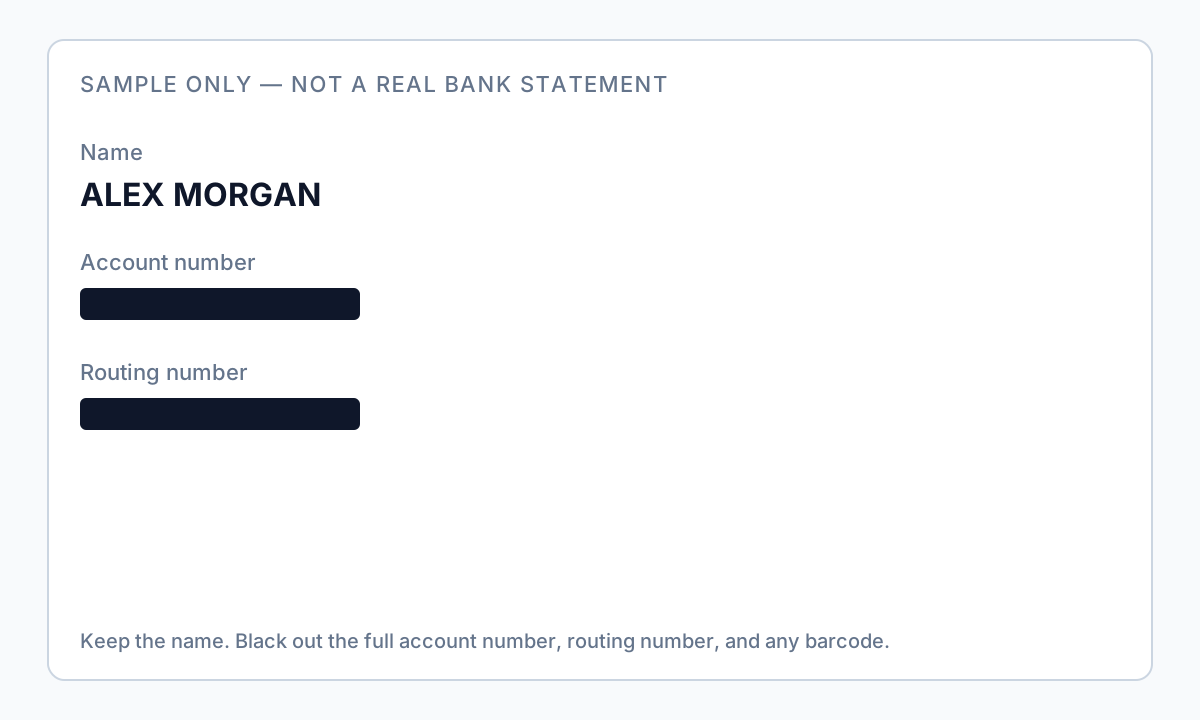
| Account statement | Full account and routing numbers, check images | Name, period, the balances the reviewer needs |
| Card image or dispute | Full card number, CVV, barcode | Name and last 4, if the form asks |
| KYC or tax form | SSN, full direct-deposit account | Name and the income figure |
| Payroll or invoice bundle | Employee SSNs, customer tax IDs, wire details | Totals and invoice numbers |
“Financial document redaction service” means you upload the files to a vendor. That is reasonable only under a contract that says where the files go and when they are deleted. For a statement or a client folder you already hold, desktop software avoids that upload. Either way, the export still has to pass a copy-paste test. Software overview: offline PII removal.
What counts as a financial document (and what leaks)
Anything that ties money to an identifiable person or account belongs in this bucket. The sensitive fields repeat in predictable places—which helps auto-detection, but also means one missed footer or attached W-2 undoes an hour of careful work.
| Document type | High-risk fields | Often-overlooked leaks |
|---|---|---|
| Bank / card statements | Account & routing numbers, full transaction history, addresses | Footers on every page, check images, ACH counterparty fragments |
| W-2 / 1099 / 1040 | SSN, EIN, wages, refund bank routing/account | Tax software footers, spouse SSN on joint returns, attached state forms |
| Payroll register | Employee SSN, salary, direct-deposit bank details, benefits | Summary pages that list every employee on one sheet |
| Invoice / remittance | Customer tax ID, billing address, payment URLs, line-item pricing | Embedded Excel attachments, QR payment codes |
| Loan / wire PDF | Loan account numbers, collateral descriptions, co-borrower PII | Confirmation pages with full account numbers in small type |
| Audit workpapers | Trial balance detail, related-party names, bank rec support | Hidden comment layers from Excel-to-PDF export |
Open the guide that matches the file: redacted bank statement, black out a credit card statement, redacted billing statement, redacted card image with name and last 4, redact a W-2, redact an invoice, redact a utility bill, or redact a financial report. Payroll packs still need a per-employee identifier review even when the auditor only asked for totals.
Minimum necessary sharing — write one sentence first
Before opening any tool, finish this sentence: “Recipient X needs Y to decide Z.” Everything not required for Z is a redaction candidate. Mortgage underwriters often need consecutive months and deposit patterns—not your coffee shop history. External payroll auditors testing completeness usually need totals and rates—not every employee’s bank account. Accountants preparing your return often need full statements through a secure portal; redacting their copy defeats the purpose.
| Recipient | Typical minimum | Usually redact if not requested |
|---|---|---|
| Mortgage / loan officer | Income deposits, employer names, date range, your name/address | Full account numbers, unrelated purchases, third-party Zelle names |
| Landlord / rental application | Name, address, balance or deposit proof | Full account number, routing, entire transaction history |
| Background check (W-2) | Employer name, dates, sometimes last-4 SSN | Full SSN, exact wages if not required (check state salary-history laws) |
| External auditor (payroll) | Totals, rates, headcount, sample selections they specify | Bulk SSN list, direct-deposit account numbers for all staff |
| Court / opposing counsel | Only what the order or meet-and-confer allows | Assume nothing—get a field list from counsel |
Editing balances, moving deposits, or altering amounts on a statement is fraud. True redaction permanently deletes selected content. If a recipient says “no altered documents,” clarify that you used permanent redaction on a portal download—not that you changed financial figures.
Why “black boxes” fail on every financial PDF type
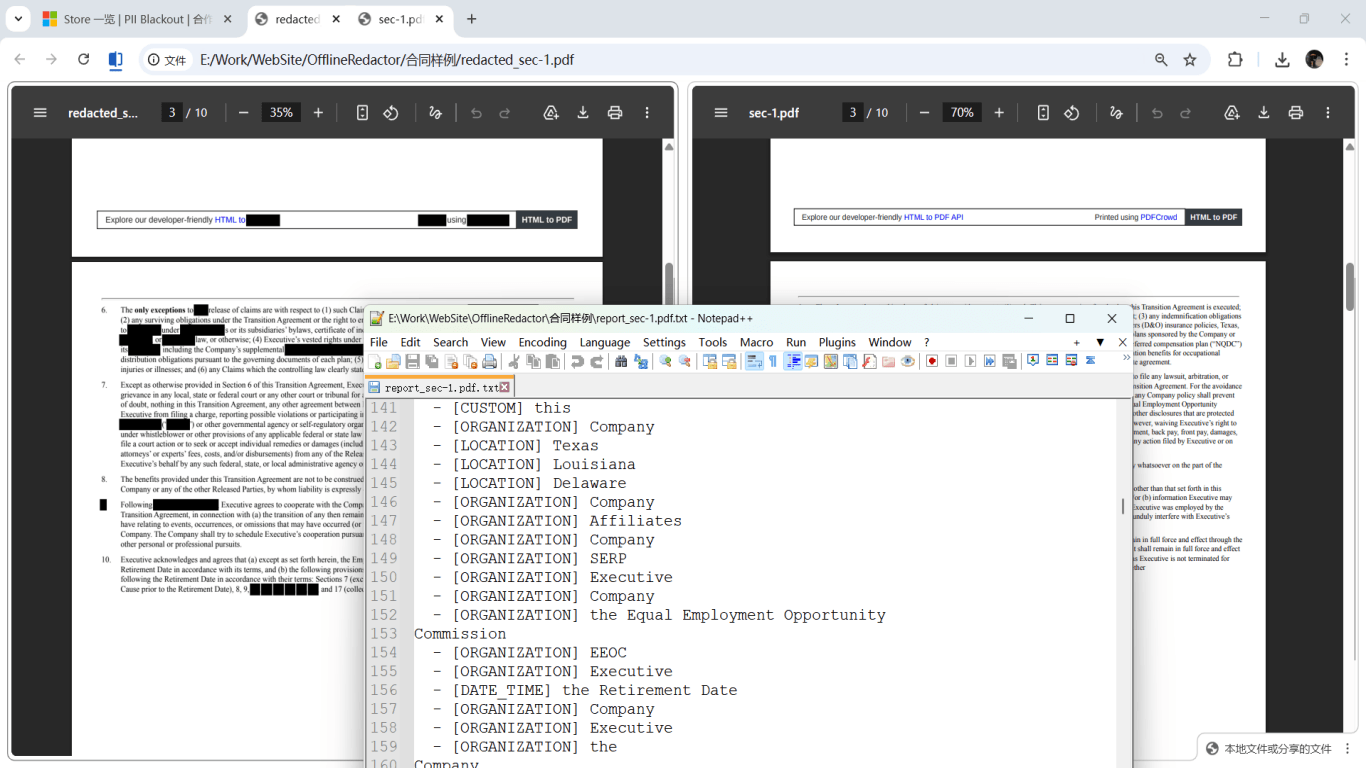
Preview shapes, Word text boxes, highlighter tools, and most “free redact PDF online” uploaders add a visual layer on top of the original text. The PDF content stream still stores SSNs, account digits, and invoice line items. Recipients—or anyone who intercepts the file—can Select All, copy, paste into Notepad, or run pdftotext and recover what you thought was hidden. Adobe Acrobat Pro fails the same way if you mark boxes but skip Apply Redactions—a mistake so common that security blogs document it as a top failure mode.
Open your exported file → Ctrl+A / Cmd+A → Copy → Paste into Notepad. Search (Ctrl+F) for your SSN, last four account digits, or an employee name you redacted. Zero hits means you likely have true redaction or a verified flat image export. Any hit means start over.
Financial PDFs also leak outside visible text: Author metadata from Excel exports, embedded attachments (original .xlsx inside the PDF), form field values on fillable applications, JavaScript on some government forms, and incremental save history in files edited multiple times. Professional workflows treat content redaction and metadata sanitization as two steps—or use export modes that strip both at once.
Document-type redaction checklists
Use these as page-by-page prompts. Run auto-detection for SSN, EIN, ITIN, routing, account, and card patterns first, then manually inspect areas algorithms miss.
- Statements: redact headers, footers, check images, barcodes—use the bank statement and credit card guides above for lender-specific tables.
- W-2 / 1099: redact Box a SSN/TIN, employer EIN if not required, Box 12 codes that reveal health or retirement detail you were not asked to share.
- 1040 packet: include all schedules and state returns in the same pass; search for spouse and dependent SSNs on every page.
- Payroll: redact SSN column and bank columns on employee detail sheets; confirm summary tabs do not repeat identifiers.
- Invoices: redact customer tax IDs, internal cost columns, and payment links; open the attachments panel for embedded files.
- Loan docs: redact account numbers in headers and wire instructions; keep payment amounts only if the recipient needs them.
Offline workflow and batch packs (month-end, audit, loan)
Controllers and bookkeepers often export dozens of PDFs at month-end. Uploading that folder to ad-supported websites sends regulated client data through infrastructure you do not control—even when the site claims deletion. Desktop tools keep detection and export on your machine, which matters for sole proprietors and small firms without enterprise DLP.
- Save originals in a folder you never share (e.g., financial-originals-2025-Q1/).
- Pick one detection profile: financial IDs + names + emails; run a pilot on three representative files.
- Review Step 1 / Analyze output on dense pages (payroll summary, multi-page statements).
- Apply redaction; export to financial-redacted-2025-Q1/ with date-based filenames—not account numbers.
- Spot-check first, middle, and last file in the batch; batch errors scale fast.
- Log what was sent (filename, date, recipient) without pasting sensitive content into tickets.

When print-and-scan still makes sense
Printing, physically covering lines with opaque tape or marker, and scanning to a flat image removes the text layer entirely—if the scan is not a hybrid PDF with invisible OCR text re-introduced. It is slow for multi-month loan packages and looks unprofessional, but forum users still choose it when they distrust PDF software. If you use this path, open the scan in a viewer and confirm you cannot select any digits before emailing.
For recurring workflows (monthly landlord proof, quarterly audit samples), true PDF redaction with verification is faster and repeatable. Reserve print-and-scan for one-off shares or when the source is already paper-only.
Stapsgewijze workflow
- List every PDF in the packet by type (statement, W-2, payroll, invoice, etc.).
- Email the recipient: “Which fields do you require?” Save their reply.
- Copy originals to a local folder; never edit the only copy.
- Choose true redaction software (offline desktop or Acrobat Pro with Apply Redactions)—not highlight or shape tools.
- Enable detection for SSN, EIN, routing, account, and card patterns; add custom labels your bank or payroll system uses.
- Run analyze/preview on all files; manually box barcodes, check images, and embedded attachments.
- Apply permanent redaction; export new filenames without account numbers in the name.
- Verification: Ctrl+A paste test, Find for last-4 SSN/account digits, second PDF reader check.
- Scrub metadata (Author, Creator, embedded attachments) if your tool supports sanitization.
- Send via the recipient’s secure upload or encrypted channel; keep originals offline.
Veelgemaakte fouten
- Treating every financial PDF the same
Tax forms need SSN sweeps; statements need footer and check-image passes; payroll needs column-level review. One generic black box on page 1 misses 90% of leaks.
- Redacting the 1040 but not attached W-2s
Packets leak through the highest-sensitivity attachment you forgot. Process the whole zip as one job.
- Uploading client payroll to free online redactors
One upload exposes every employee on that register. Offline processing keeps regulated data on your machine.
- Skipping Apply Redactions in Adobe
Marked boxes that were never applied look identical to real redaction but leave full text in the file—the most common Acrobat failure mode.
- Forgetting embedded Excel or attachments in PDF
Some invoice and audit exports attach the source spreadsheet. Open the attachments panel and redact or remove embedded files separately.
Controle vóór delen
- ✓ Ctrl+A → Copy → Paste: no SSN, full account, or routing numbers.
- ✓ Find/Search for last four digits of account or SSN: no unexpected hits.
- ✓ All attachments in the PDF panel reviewed or removed.
- ✓ Metadata Author/Creator cleared if you scrubbed it.
- ✓ Sample of three random files from a batch read page-by-page.
- ✓ Recipient confirmed the file opens correctly in their environment.
Probeer de Bankafschrift-sjabloon online
Upload een PDF of afbeelding en laat de Bankafschrift-sjabloon rekeningen, routing, contact en QR/barcodes vinden—controleer daarna vóór redactie.
De sjabloon Bankafschrift is vooraf geselecteerd voor deze gids. Upload een voorbeeldbestand om detecties te zien en download de desktop-app voor vertrouwelijk batchwerk.
Online redigeren — BankafschriftOffline-tooloptie
Voor bankafschriften, juridische producties, HR-bestanden en andere risicovolle PDF’s detecteert desktopsoftware met offline PII-verwijdering identifiers, laat u matches controleren en permanente redactie toepassen zonder cloud-upload. PDF-redactiehub en bulk PII-redactie helpen bij hele mappen.
Gratis proefversie downloadenFAQ
What counts as a financial document for redaction?
Any record with monetary amounts tied to identifiable people or accounts: statements, tax forms, invoices, remittance advices, wire confirmations, payroll registers, and audit schedules. If it has an account number, tax ID, or salary next to a name, treat it as financial.
Should I redact dollar amounts?
Only when the recipient does not need them. Many workflows require amounts (income verification, invoice totals) but not identifiers. Separate “amount OK” from “account number must go” in your checklist.
Can I use free online PDF redaction for a W-2 or bank statement?
We do not recommend it. You upload complete financial history to third-party servers with unknown retention. Use offline desktop redaction or Acrobat Pro on your machine instead.
Will my mortgage lender accept redacted financial documents?
Most accept redacted statements when income and identity remain verifiable from what you left visible. They may reject files that look tampered without explanation. Ask the loan officer before you send; never alter amounts—only remove fields.
Do I need different steps for scanned vs. digital PDFs?
Digital PDFs leak via copy-paste on hidden text layers. Scanned PDFs leak via OCR text re-added on export and via images of checks that still show account numbers. Both need verification after redaction; scans may need manual boxes on image regions.
- Geredigeerd bankafschrift: wat zwart maken
- Creditcardafschrift in PDF zwart maken
- Geredigeerd factuuroverzicht: voorbeeld
- Geredigeerde kaartafbeelding: naam en laatste 4
- Hoe belastingdocumenten veilig te redigeren
- Een factuur-pdf redigeren: verberg de klantnaam
- Een energierekening redigeren: houd naam en adres
- Hoe financiële rapporten te redigeren
- PDF-tekst zwart maken zodat die niet gekopieerd kan worden
- Hoe een PDF zonder Adobe te redigeren
- Hoe PDF’s in batch te redigeren