
Mis à jour 2026-06-06
Comment rédacter des documents judiciaires
La plupart des dépôts civils deviennent publics dès qu'ils atteignent CM/ECF ou un portail d'e-filing d'État—indexés par Google en quelques jours. La Federal Rule of Civil Procedure 5.2 et ses équivalents d'État (comme California Rule 1.201) exigent de tronquer les numéros de Sécurité sociale, numéros de compte financier, identifiants de mineurs et dates de naissance complètes dans les documents déposés publiquement. Les greffes ne vérifient généralement pas votre PDF pour conformité ; le déposant en porte la responsabilité. Essayez le modèle Document juridique en ligne sur un PDF de dépôt pour prévisualiser les identifiants détectés automatiquement. Voir comment rédacter des documents juridiques et comment supprimer les métadonnées d'un PDF avant de soumettre.
- → What do I need to redact before filing in CM/ECF?
- → Can I file a full Social Security number in a court document?
- → Does the court clerk check if my PDF is redacted?
- → What is the difference between filing under seal and a redacted public version?
- → How do I redact exhibits attached to a court filing?
Identifiers you must limit in public filings
FRCP 5.2(a) applies unless the court orders otherwise. In publicly filed documents containing certain identifiers, filers may include only truncated forms. Many state rules mirror this list. Always read your district’s standing order—local additions (driver license numbers, medical record detail) are common.
| Identifier | Public filing usually allows | Often requires seal motion if full value needed |
|---|---|---|
| Social Security number | Last four digits only | Full SSN |
| Taxpayer ID (EIN/ITIN) | Last four digits | Full TIN when not truncated |
| Date of birth | Year only | Full DOB |
| Minor’s name | Initials | Full name |
| Financial account number | Last four digits (+ institution name/type) | Full account number |
| Home address (criminal cases) | City and state only | Full street address |
FRCP 5.2 states the clerk is not required to review filings for compliance. Uploading an unredacted SSN is a privacy violation—not something the system blocks automatically. You must verify before filing.
Public redacted version vs. filed under seal
Some material cannot be fixed with truncation—you need a sealed copy, a confidential appendix, or a reference list procedure your district allows. Rule 5.2(d) lets courts order filings under seal without redaction; courts may later unseal or require a redacted public version. Know which category your exhibit falls into before you publish a full account number “just once” in a public PDF.
- Public docket PDF: truncated identifiers per Rule 5.2(a).
- Sealed appendix: full values when court permits; still handle securely offline.
- Reference list under seal: some districts allow sealed lists mapping redacted labels to real identifiers.
- Exemptions: check Rule 5.2(b) and local rules (e.g., certain criminal, habeas, or sealed-matter categories).
Wrong ways courts warn against (N.D. Cal. and others)
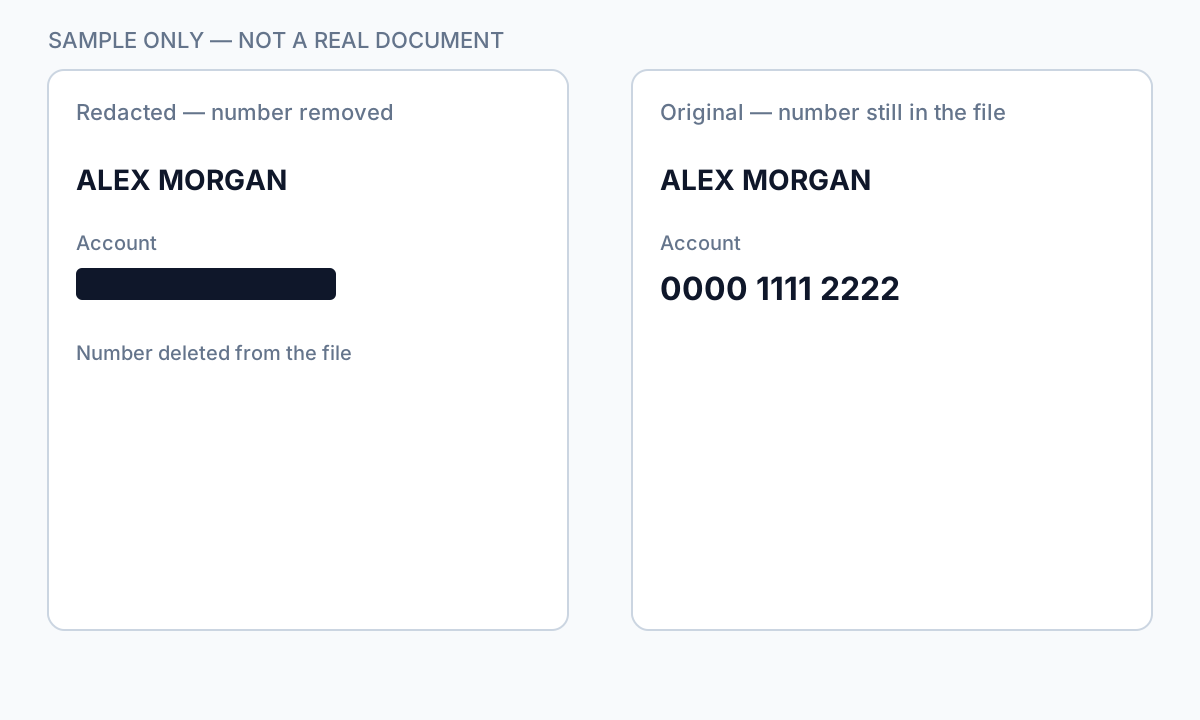
Federal court CM/ECF help pages explicitly list wrong redaction methods: black marker on paper without proper rescan, WordPerfect/Word highlight tricks, and PDF annotation tools that leave recoverable text. The Northern District of California’s e-filing guidance describes a “notebook method” for paper and proper PDF redaction for scanned and native files—both require permanent removal, not visual cover.
Open your filing PDF → Select All → Copy → Paste into Notepad. If a full SSN or account number appears, you are about to publish it to the internet. Stop and re-redact with true removal.
End-to-end filing workflow
- Read local rules, standing orders, and CM/ECF procedures for your district.
- Prepare working copies: public-redacted and sealed-unredacted if both required.
- Redact complaint/petition through all exhibits and attachments—exhibits are where SSNs hide.
- Apply true redaction (Apply Redactions or offline burn-in on scans).
- Verify: search PDF for \d{3}-\d{2}-\d{4} patterns, full nine-digit runs, account keywords.
- Confirm pagination, bookmarks, and CM/ECF size limits still valid.
- Scrub metadata (Author email from Word export is a common leak).
- Upload public version; file sealed companion via correct event if applicable.
- After acceptance, spot-check the public docket PDF from the clerk’s link.

Scanned exhibits and bankruptcy schedules
Bank statements, tax returns, and medical records attached as scanned PDFs need OCR or area burn-in redaction—Find-and-redact on image pages misses content. Treat each exhibit as its own redaction job. Bankruptcy forms and schedules often repeat SSNs on every page; run full-document search after redaction, not just page one.
After filing: corrections are expensive
Fixing an unredacted filing often requires a motion to strike, a corrected redacted version, and sometimes notice to affected parties. Filing the unredacted PDF to meet a deadline and planning to “fix later” creates a public record window—even brief exposure is reportable in some contexts. Redact first; file second.
Flux étape par étape
- Pull district CM/ECF redaction checklist and FRCP/state rule counterpart.
- List every PDF in the filing (main document + each exhibit).
- Truncate or remove identifiers per rule table; flag items needing sealed treatment.
- Redact with true removal tools—never highlight-only.
- Search entire packet for SSN, DOB, minor names, full account numbers.
- Prepare sealed companion filing if full identifiers required.
- Scrub metadata; verify PDF size and bookmark requirements.
- Upload public redacted version; confirm docket PDF opens correctly.
- Archive unredacted sealed copy per retention policy.
Erreurs fréquentes
- Filing unredacted PDF to meet a deadline
Correction motions and privacy notifications cost more than pre-filing verification.
- Redacting the pleading but not exhibits
Exhibits are the highest-volume SSN source in many filings.
- Assuming CM/ECF blocks sensitive uploads
Systems accept non-compliant PDFs; compliance is the filer’s duty under Rule 5.2.
- Using last-four SSN in narrative when full number appears elsewhere
Search the whole packet—footnotes and exhibit stamps repeat identifiers.
Vérification avant partage
- ✓ Zero full SSN/TIN matches in public filing PDF search.
- ✓ Minor names truncated to initials where required.
- ✓ Account numbers last-four only (with institution label if rule requires).
- ✓ DOB year-only in public version.
- ✓ Sealed companion filed if full identifiers needed.
- ✓ Public docket PDF spot-checked after acceptance.
Try the Legal Document template online
Use the Legal Document preset to detect parties, addresses, IDs, and contact fields—without routing numbers that false-positive on fund CUSIPs.
Le modèle Document juridique est présélectionné pour ce guide. Téléversez un fichier exemple pour voir les détections, puis téléchargez l’appli bureau pour le travail par lots confidentiel.
Rédiger en ligne — Document juridiqueOption outil hors ligne
Pour relevés bancaires, productions juridiques, RH et autres PDF à risque, un logiciel bureau avec suppression PII hors ligne détecte les identifiants, permet de revoir les correspondances et d’appliquer une rédaction permanente sans envoi cloud. hub de rédaction PDF et rédaction PII en lot aident pour des dossiers entiers.
Télécharger l’essai gratuitFAQ
Can I redact after filing?
Sometimes with leave of court or by filing a corrected version—but the public may already have retrieved the original. Redact before initial upload whenever possible.
Does the clerk reject filings with full SSNs?
Generally no automatic rejection. You remain responsible under Rule 5.2 and may face motions or privacy complaints if identifiers were exposed.
Do state courts use the same rules as federal CM/ECF?
Concepts align (truncate SSN, protect minors), but each state and county portal differs. Read your court’s e-filing handbook.
Can solo attorneys use offline redaction instead of Adobe?
Yes, if the tool permanently removes text and passes your copy/search QC—the court cares about the result, not the vendor.
- Rédiger un PDF signé sans l’invalider
- Comment rédacter un PDF dans Adobe Acrobat
- Comment rédacter des documents juridiques en toute sécurité
- Comment rédacter un contrat sans risque juridique
- Relevé bancaire rédacté : quoi noircir
- Comment rédacter des PDF par lots
- Comment rédacter un PDF scanné (OCR requis)
- Comment rédacter un PDF sans Adobe