
Mis à jour 2026-10-21
Relevé de facturation rédacté : exemple
Un relevé de facturation rédacté est un PDF de carte ou de facture dont les identifiants de compte sont supprimés définitivement, tandis que l’émetteur, la date et les montants à prouver restent visibles. C’est plus large qu’une image de carte rédigée. Les étapes sont dans noircir un relevé de carte.
- → What is a redacted billing statement?
- → What does a redacted billing statement look like?
- → How do I redact a credit card billing statement PDF?
- → Can I send a redacted billing statement to a landlord or CPA?
- → Do I need to redact barcodes on a billing statement?
Redacted billing statement meaning
In plain English: you export (or download) a statement PDF, permanently remove sensitive account data, and keep only what the recipient needs—usually name, billing period, and selected line items or a payment confirmation amount. If they can still copy “hidden” card digits into Notepad, you have a visual blackout, not a redacted billing statement.
Email: “I can provide a billing statement with name, statement date, and [payment/charge] visible, and account numbers redacted—is that acceptable?”
Billing statement vs card image vs bank statement
| You need… | Use this guide |
|---|---|
| Statement period + selected charges (billing PDF) | This page — redacted billing statement |
| Name + last 4 only (minimal payment ID) | Redacted card image |
| Full card statement field checklist | Black out credit card statement |
| Bank deposits / income proof | Redacted bank statement |
| Utility bill as address proof | Redact a utility bill |
| Whole financial packet (statements, tax, invoices) | Redact financial PDFs |
Example: what to keep vs black out
| Field | Usually keep | Usually redact |
|---|---|---|
| Cardholder / account name | Yes | Secondary names if not required |
| Statement / billing period | Yes | — |
| Selected payment or charge lines | Yes—minimum necessary | Unrelated personal merchants |
| Full / partial card number beyond last 4 | No | Permanent removal |
| CVV / security code | Never | Always |
| Billing address | Case-by-case | Redact if only payment proof needed |
| Rewards / membership ID | No | Links accounts |
| Payment stub barcode / QR | No | Entire stub band |
| Interest / credit limit boxes | Rarely needed | Redact if hiding financial position |
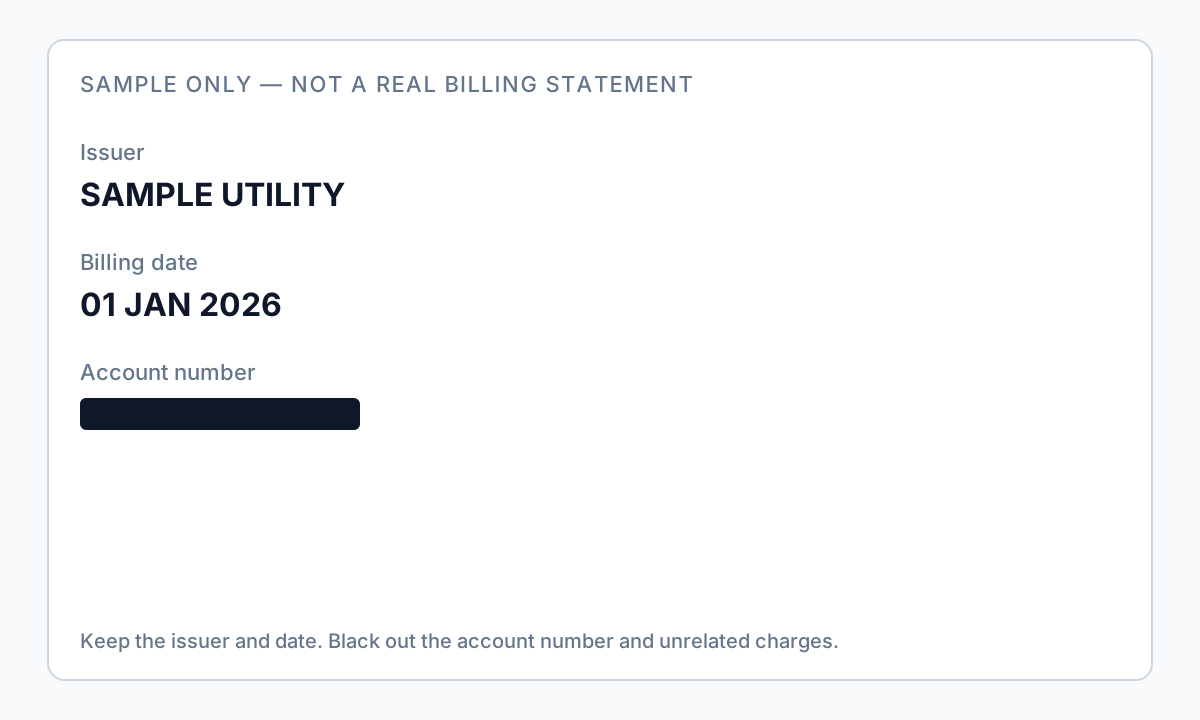
Autopay stubs often include barcodes or QR codes. Covering only the human-readable digits leaves the account recoverable. Redact the full stub region.
How to create a redacted billing statement PDF
- Download the PDF from the issuer or utility portal (prefer PDF over HTML print).
- Confirm what the recipient needs: period only, one payment line, or selected merchants.
- Permanently remove card/account numbers beyond last four (if last four must stay), CVV, unused address lines, and barcodes.
- Keep name and statement date visible unless told otherwise.
- Export a new file; never overwrite the original.
- Ctrl+A → Copy → Paste into Notepad; search for middle digits and ZIP.
- Scrub metadata; use a boring filename without the full account number.
Prefer offline PII removal for client or regulated bills. Overlay tools in Preview or Word usually fail the paste test—see how to blackout a PDF.
Flux étape par étape
- Confirm recipient requirements (period, amount, merchants, address).
- Download issuer PDF; work on a copy.
- Redact account identifiers and barcodes permanently—not overlay boxes.
- Keep name and billing period; keep only agreed charge lines.
- Save as billing-redacted-YYYY-MM.pdf.
- Run Ctrl+A paste test and Find for known digits.
- Remove metadata; share via secure portal when available.
Erreurs fréquentes
- Treating a card photo as a billing statement
Landlords or CPAs who asked for a statement usually want period and amount—not a wallet photo. Use the card image guide only when they ask for name + last four.
- Blacking out the number line but leaving the barcode
The stub still encodes the account. Redact the entire barcode/QR region.
- Sending every merchant line “just in case”
Over-sharing medical, legal, or personal purchases creates unnecessary risk. Minimum necessary.
Vérification avant partage
- ✓ Paste test shows no full PAN / account number and no CVV.
- ✓ Barcode/QR stub removed or non-recoverable.
- ✓ Name and statement period visible if required.
- ✓ Filename and metadata do not contain full account digits.
Essayez le modèle Relevé bancaire en ligne
Téléversez un PDF ou une image et laissez le modèle Relevé bancaire détecter comptes, routing, contact et QR/codes-barres—puis révisez avant d’appliquer.
Le modèle Relevé bancaire est présélectionné pour ce guide. Téléversez un fichier exemple pour voir les détections, puis téléchargez l’appli bureau pour le travail par lots confidentiel.
Rédiger en ligne — Relevé bancaireOption outil hors ligne
Pour relevés bancaires, productions juridiques, RH et autres PDF à risque, un logiciel bureau avec suppression PII hors ligne détecte les identifiants, permet de revoir les correspondances et d’appliquer une rédaction permanente sans envoi cloud. hub de rédaction PDF et rédaction PII en lot aident pour des dossiers entiers.
Télécharger l’essai gratuitFAQ
What is a redacted billing statement?
A billing PDF (often a credit card or similar statement) where account numbers and barcodes are permanently removed, while name, statement date, and selected charges remain visible for the recipient.
Is a redacted billing statement the same as a redacted bank statement?
No. Bank statements prove deposits and balances; billing statements prove card or service charges. Use the bank statement guide for lenders needing income proof.
Will my landlord accept a redacted billing statement?
Often yes for payment or address context—ask first. Some want a utility bill specifically; use the utility bill guide when that is the request.
Can I use Preview or Word to black out the PDF?
Usually not safely. Overlay boxes leave recoverable text. Use true redaction and always run the Ctrl+A paste test.
- Noircir un relevé de carte bancaire PDF
- Image de carte rédigée : nom et 4 derniers chiffres
- Relevé bancaire rédacté : quoi noircir
- Rédiger des PDF financiers : quoi noircir
- Rédiger une facture d’énergie : garder nom et adresse
- Rédiger une facture PDF : masquer le client
- Noircir le texte d’un PDF pour qu’il ne se copie plus
- Comment rédacter un PDF sans Adobe