
Atualizado 2026-10-21
Extrato de faturação redigido: exemplo
Um extrato de faturação redigido é um PDF de cartão ou de fatura em que os identificadores da conta são removidos de forma permanente, enquanto o emissor, a data e os valores a provar ficam visíveis. É mais amplo do que uma imagem de cartão redigida. Os passos estão em anular um extrato de cartão.
- → What is a redacted billing statement?
- → What does a redacted billing statement look like?
- → How do I redact a credit card billing statement PDF?
- → Can I send a redacted billing statement to a landlord or CPA?
- → Do I need to redact barcodes on a billing statement?
Redacted billing statement meaning
In plain English: you export (or download) a statement PDF, permanently remove sensitive account data, and keep only what the recipient needs—usually name, billing period, and selected line items or a payment confirmation amount. If they can still copy “hidden” card digits into Notepad, you have a visual blackout, not a redacted billing statement.
Email: “I can provide a billing statement with name, statement date, and [payment/charge] visible, and account numbers redacted—is that acceptable?”
Billing statement vs card image vs bank statement
| You need… | Use this guide |
|---|---|
| Statement period + selected charges (billing PDF) | This page — redacted billing statement |
| Name + last 4 only (minimal payment ID) | Redacted card image |
| Full card statement field checklist | Black out credit card statement |
| Bank deposits / income proof | Redacted bank statement |
| Utility bill as address proof | Redact a utility bill |
| Whole financial packet (statements, tax, invoices) | Redact financial PDFs |
Example: what to keep vs black out
| Field | Usually keep | Usually redact |
|---|---|---|
| Cardholder / account name | Yes | Secondary names if not required |
| Statement / billing period | Yes | — |
| Selected payment or charge lines | Yes—minimum necessary | Unrelated personal merchants |
| Full / partial card number beyond last 4 | No | Permanent removal |
| CVV / security code | Never | Always |
| Billing address | Case-by-case | Redact if only payment proof needed |
| Rewards / membership ID | No | Links accounts |
| Payment stub barcode / QR | No | Entire stub band |
| Interest / credit limit boxes | Rarely needed | Redact if hiding financial position |
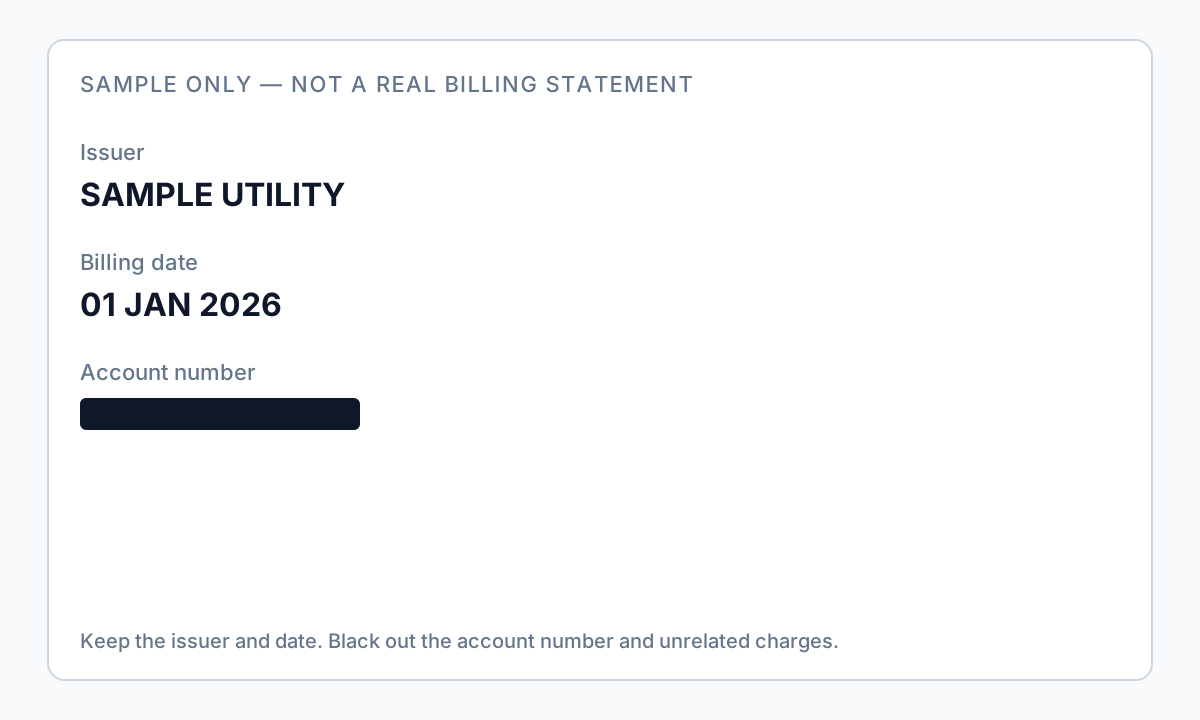
Autopay stubs often include barcodes or QR codes. Covering only the human-readable digits leaves the account recoverable. Redact the full stub region.
How to create a redacted billing statement PDF
- Download the PDF from the issuer or utility portal (prefer PDF over HTML print).
- Confirm what the recipient needs: period only, one payment line, or selected merchants.
- Permanently remove card/account numbers beyond last four (if last four must stay), CVV, unused address lines, and barcodes.
- Keep name and statement date visible unless told otherwise.
- Export a new file; never overwrite the original.
- Ctrl+A → Copy → Paste into Notepad; search for middle digits and ZIP.
- Scrub metadata; use a boring filename without the full account number.
Prefer offline PII removal for client or regulated bills. Overlay tools in Preview or Word usually fail the paste test—see how to blackout a PDF.
Fluxo passo a passo
- Confirm recipient requirements (period, amount, merchants, address).
- Download issuer PDF; work on a copy.
- Redact account identifiers and barcodes permanently—not overlay boxes.
- Keep name and billing period; keep only agreed charge lines.
- Save as billing-redacted-YYYY-MM.pdf.
- Run Ctrl+A paste test and Find for known digits.
- Remove metadata; share via secure portal when available.
Erros comuns
- Treating a card photo as a billing statement
Landlords or CPAs who asked for a statement usually want period and amount—not a wallet photo. Use the card image guide only when they ask for name + last four.
- Blacking out the number line but leaving the barcode
The stub still encodes the account. Redact the entire barcode/QR region.
- Sending every merchant line “just in case”
Over-sharing medical, legal, or personal purchases creates unnecessary risk. Minimum necessary.
Verificação antes de partilhar
- ✓ Paste test shows no full PAN / account number and no CVV.
- ✓ Barcode/QR stub removed or non-recoverable.
- ✓ Name and statement period visible if required.
- ✓ Filename and metadata do not contain full account digits.
Experimente o modelo Extrato bancário online
Carregue um PDF ou imagem e deixe o modelo Extrato bancário encontrar contas, routing, contactos e QR/códigos de barras—depois reveja antes de aplicar a redação.
O modelo Extrato bancário está pré-selecionado para este guia. Carregue um ficheiro de exemplo para ver deteções e descarregue a app de ambiente de trabalho para trabalhos em lote confidenciais.
Redigir online — Extrato bancárioOpção de ferramenta offline
Para extratos bancários, produções legais, ficheiros de RH e outros PDF de alto risco, o software de ambiente de trabalho com remoção de PII offline deteta identificadores, permite rever correspondências e aplicar redação permanente sem upload na cloud. hub de redação PDF e redação PII em lote ajudam com pastas inteiras.
Transferir teste gratuitoFAQ
What is a redacted billing statement?
A billing PDF (often a credit card or similar statement) where account numbers and barcodes are permanently removed, while name, statement date, and selected charges remain visible for the recipient.
Is a redacted billing statement the same as a redacted bank statement?
No. Bank statements prove deposits and balances; billing statements prove card or service charges. Use the bank statement guide for lenders needing income proof.
Will my landlord accept a redacted billing statement?
Often yes for payment or address context—ask first. Some want a utility bill specifically; use the utility bill guide when that is the request.
Can I use Preview or Word to black out the PDF?
Usually not safely. Overlay boxes leave recoverable text. Use true redaction and always run the Ctrl+A paste test.
- Anular um extrato de cartão de crédito em PDF
- Imagem de cartão redigida: nome e últimos 4
- Extrato bancário redigido: o que anular
- Redigir PDFs financeiros: o que tapar
- Redigir uma conta de serviços: manter nome e morada
- Redigir uma fatura PDF: ocultar o cliente
- Tachar texto num PDF para não poder ser copiado
- Como redigir um PDF sem Adobe